
Social Media Image Sizes: Instagram, Facebook, YouTube and More
The safest sizes are 1080 × 1080 for a square Instagram post, 1080 × 1350 for a portrait post, 1080 × 1920 for any story or reel, 1280 × 720 for a YouTube thumbnail and 1200 × 630 for a link or post image on Facebook. The tables below list every size, by platform, with a link to resize your image to it.
How to use these sizes
Each size below is a template in TypeorDrop's Resize Image tool, so you can pick it from a list instead of typing numbers. Two things matter more than hitting the exact pixel count:
- The aspect ratio. A 4:5 portrait post can be 1080 × 1350 or 2160 × 2700; the platform scales it. The wrong ratio is what gets your picture cropped.
- Enough pixels. Upload at least the size listed. A smaller image gets stretched and looks soft.
Platforms change their layouts from time to time, so if something looks off, check the platform's own help pages.
Image sizes by platform
| Image | Size (pixels) | Aspect ratio | Resize tool |
|---|---|---|---|
| Post (square) | 1080 × 1080 | 1:1 | Resize to 1080 × 1080 |
| Portrait | 1080 × 1350 | 4:5 | Resize to 1080 × 1350 |
| Landscape | 1080 × 566 | 1.91:1 | Resize to 1080 × 566 |
| Story / Reel | 1080 × 1920 | 9:16 | Resize to 1080 × 1920 |
| Profile photo | 320 × 320 | 1:1 | Resize to 320 × 320 |
| Image | Size (pixels) | Aspect ratio | Resize tool |
|---|---|---|---|
| Profile photo | 320 × 320 | 1:1 | Resize to 320 × 320 |
| Cover photo | 851 × 315 | 2.70:1 | Resize to 851 × 315 |
| Post | 1200 × 630 | 1.90:1 | Resize to 1200 × 630 |
| Square post | 1080 × 1080 | 1:1 | Resize to 1080 × 1080 |
| Story | 1080 × 1920 | 9:16 | Resize to 1080 × 1920 |
| Event cover | 1920 × 1005 | 1.91:1 | Resize to 1920 × 1005 |
YouTube
| Image | Size (pixels) | Aspect ratio | Resize tool |
|---|---|---|---|
| Thumbnail | 1280 × 720 | 16:9 | Resize to 1280 × 720 |
| Channel banner | 2560 × 1440 | 16:9 | Resize to 2560 × 1440 |
| Profile photo | 800 × 800 | 1:1 | Resize to 800 × 800 |
| Image | Size (pixels) | Aspect ratio | Resize tool |
|---|---|---|---|
| Profile photo | 400 × 400 | 1:1 | Resize to 400 × 400 |
| Banner | 1584 × 396 | 4:1 | Resize to 1584 × 396 |
| Post | 1200 × 627 | 1.91:1 | Resize to 1200 × 627 |
X (Twitter)
| Image | Size (pixels) | Aspect ratio | Resize tool |
|---|---|---|---|
| Profile photo | 400 × 400 | 1:1 | Resize to 400 × 400 |
| Header | 1500 × 500 | 3:1 | Resize to 1500 × 500 |
| Post | 1600 × 900 | 16:9 | Resize to 1600 × 900 |
| Image | Size (pixels) | Aspect ratio | Resize tool |
|---|---|---|---|
| Pin | 1000 × 1500 | 2:3 | Resize to 1000 × 1500 |
| Image | Size (pixels) | Aspect ratio | Resize tool |
|---|---|---|---|
| Profile photo | 500 × 500 | 1:1 | Resize to 500 × 500 |
How to resize an image to one of these sizes
- Open Resize Image, or Resize Image for Instagram, which starts with the square post template selected.
- Add your photo: JPG, PNG, WebP, HEIC, HEIF, AVIF, GIF, BMP or TIFF, up to 15 MB.
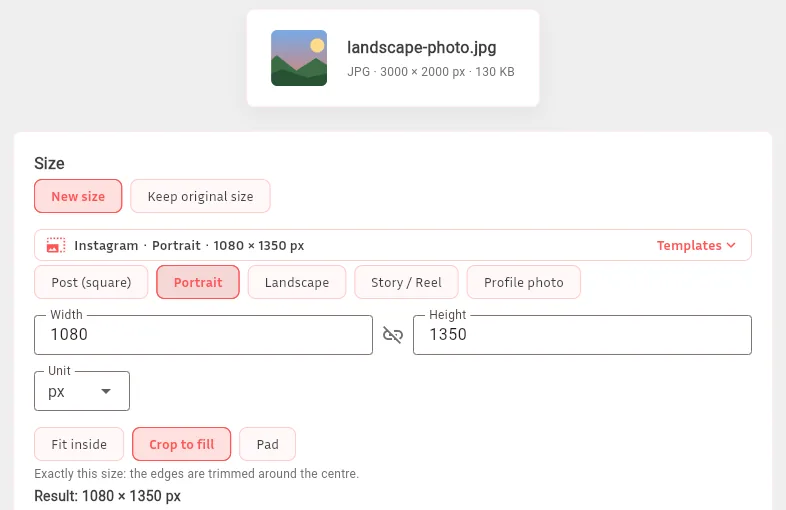
- Pick a template, such as Instagram › Portrait or YouTube › Thumbnail. Width and height are filled in for you.
- Keep Crop to fill, which templates select for you, or switch to Fit inside or Pad (explained below).
- Optionally set a maximum file size in KB, then resize and download.
The three ways to fit a picture into a new shape:
- Crop to fill makes it exactly that size and trims the edges, keeping the center.
- Fit inside keeps the whole picture; one side can come out shorter than the size you asked for.
- Pad keeps the whole picture and adds white or transparent bands to reach the exact size.
Tips for sharp social images
- Keep important things in the middle. Profile photos are shown as circles on most platforms, and covers are cropped differently on phones and computers.
- Leave room around text. Banners on YouTube, LinkedIn and X are cut off at the edges on some screens; keep logos and words near the center.
- Use JPG for photos and PNG for graphics with text. PNG keeps lettering crisp; JPG keeps photo files small.
- iPhone photos (HEIC): Resize Image saves them as JPG, which every platform accepts. To convert without resizing, use HEIC to JPG.
- Too big to upload? Make the file smaller with Compress Image.
Troubleshooting
My Instagram post got cropped. The picture wasn't 1:1, 4:5 or 1.91:1. Resize it to one of the Instagram templates with Crop to fill, or use Pad to keep the whole picture.
The image looks blurry after uploading. It was smaller than the size listed and got stretched, or the platform compressed it again. Start from the original photo, not a screenshot or a downloaded copy.
Part of my face is cut off. Crop to fill keeps the center. Crop the photo first with Crop Image so you are in the middle, then resize.
The template made my image bigger. Resize Image can enlarge up to twice the original width and height, and tells you when it did. Enlarging can't add detail; use a larger original if you have one.
My cover photo looks different on my phone. Covers and banners are shown at different widths on phones and computers. Keep text and faces away from the edges.
FAQ
What is the best image size for Instagram?
1080 × 1350 (4:5) for portrait posts, which take up more of the feed than square or landscape posts; 1080 × 1080 for square posts; 1080 × 1920 for stories and reels.
What size is a YouTube thumbnail?
1280 × 720 pixels, a 16:9 ratio. Keep the file small enough for YouTube to accept it; Compress Image can help.
What size should a Facebook post image be?
1200 × 630 for link and landscape post images, or 1080 × 1080 for a square post. Facebook story images are 1080 × 1920.
Does resizing reduce the quality of my photo?
Making an image smaller keeps it sharp. Making it bigger can't add detail, so it looks softer. Resize Image tells you when your picture had to be enlarged.
Is Resize Image free?
Yes. You can run 2 jobs a day without an account and 10 a day with a free account. Uploaded images are deleted automatically within about 24 hours, and results after 7 days.
Related articles
- How to Make a Favicon from a PNG (ICO Sizes and HTML Tag)
- The Best Free Online Image Tools, Compared Honestly